How TRYPS Works: Plan a Group Trip From Invite to Settle-Up
Group trips fall apart in the planning, not the trip itself. TRYPS handles the planning so the trip can be the trip.
This is the full walkthrough — five steps, one app, no spreadsheets. From the moment you create a trip to the final expense settle-up.
The short version
TRYPS turns a group trip into five clean steps:
- Create the trip and text your group from inside the app.
- Each person sets their vibe — pace, budget, food, planning depth.
- Add ideas to the voting block, thumbs-up the winners.
- Confirmed activities flow into the day-by-day itinerary.
- Add expenses as they happen — TRYPS splits and settles the math.
No friend needs to download anything. The whole flow runs from one link.
What do you need before you start?
Almost nothing. You need an iPhone (TRYPS is iOS for now), a destination idea — even a rough one — and a rough date window. Setup takes about 2 minutes. You don't need flights booked, accommodation chosen, or your group fully confirmed.
TRYPS is built for the messy early stage of group travel where most trips quietly die. The earlier you bring it in, the more it does.
Create the trip and text your group
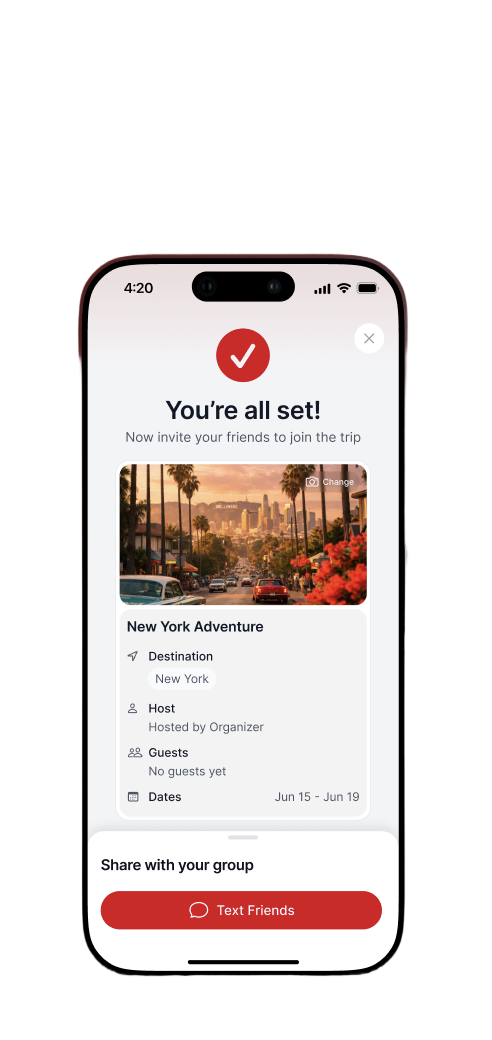
Open TRYPS, hit new trip, set a destination and a date range. Add a cover photo so the trip feels real — pulled from your camera roll or a stock library inside the app.
Then tap Text Friends. TRYPS opens iMessage with a pre-filled invite and a join link. Your friends tap the link, land inside the trip, and can immediately see the destination, dates, and other guests. No app download required. No account creation. No "what's your email?" friction.
This is where most group-trip apps lose half the group. TRYPS doesn't.
Why iMessage
Friend groups already live in group chats. Pulling them into a separate app to start coordinating is the friction point. TRYPS meets the group where it already is — then quietly takes over the planning that the chat was never going to handle anyway.
Set your group's vibe
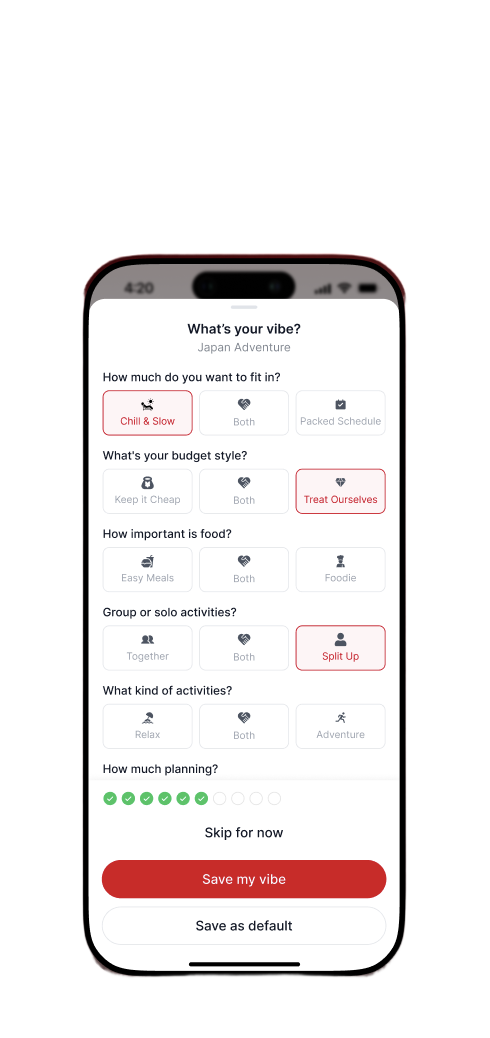
Once friends join, each person answers six short prompts. The vibe questionnaire is the bit that makes everything downstream smarter.
The six dimensions: how packed the days should be (Chill & Slow vs. Packed Schedule), budget style (Keep it Cheap vs. Treat Ourselves), food priority (Easy Meals vs. Foodie), group dynamic (Together vs. Split Up), activity type (Relax vs. Adventure), and how much planning the group wants to do upfront.
TRYPS uses the overlap — not the average — to surface activities that actually fit the group. The "Save as default" option carries your personal vibe across future trips so you only fill it out once.
Why this matters
Most group-trip arguments aren't about the trip itself — they're about unspoken mismatches in pace, budget, or food expectations. The vibe step takes about 90 seconds per person and makes those mismatches visible early, so the group can plan around them instead of arguing about them on day three.
Vote on activities together
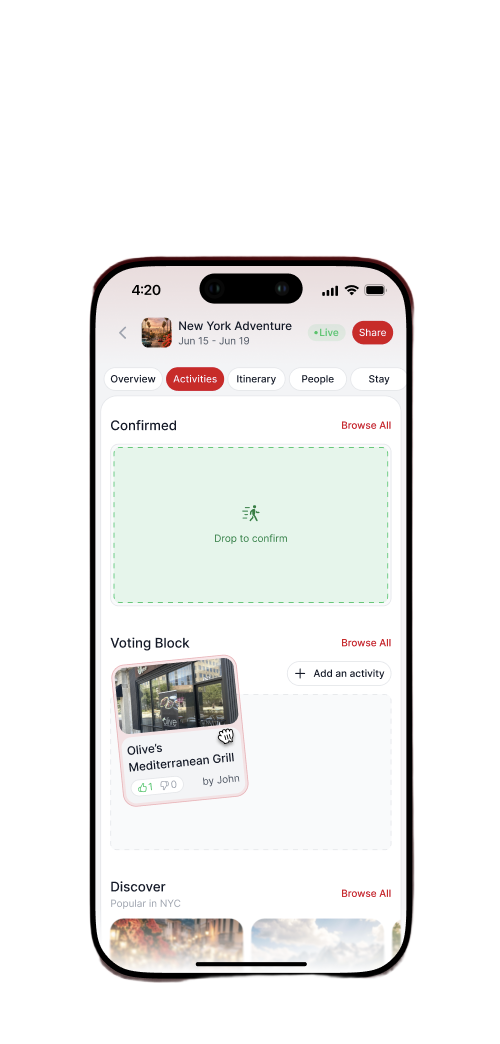
The Activities tab is where the group decides what the trip actually is. It has three zones:
- Confirmed — Locked in. Drag activities here when the group is clearly into it. Confirmed activities flow into the itinerary automatically.
- Voting Block — Ideas under consideration. Anyone can add an activity — paste a URL, search a place, or write it manually. Each person casts a thumbs-up or thumbs-down. Votes are visible to the group.
- Discover — Vibe-matched popular activities for your destination. Tap any one to add it straight to the voting block.
No more scrolling back through three weeks of WhatsApp messages to find that restaurant someone suggested. Every idea has its own card, its own vote count, and its own clear status.
The voting block vs. a group chat
In a group chat, a suggestion gets buried in 40 other messages within hours. In the Voting Block, every idea stays visible, has a vote count, and has a clear next state — either it moves to Confirmed or it doesn't make the cut. That clarity is what makes the group actually decide instead of just talking.
See the day-by-day itinerary
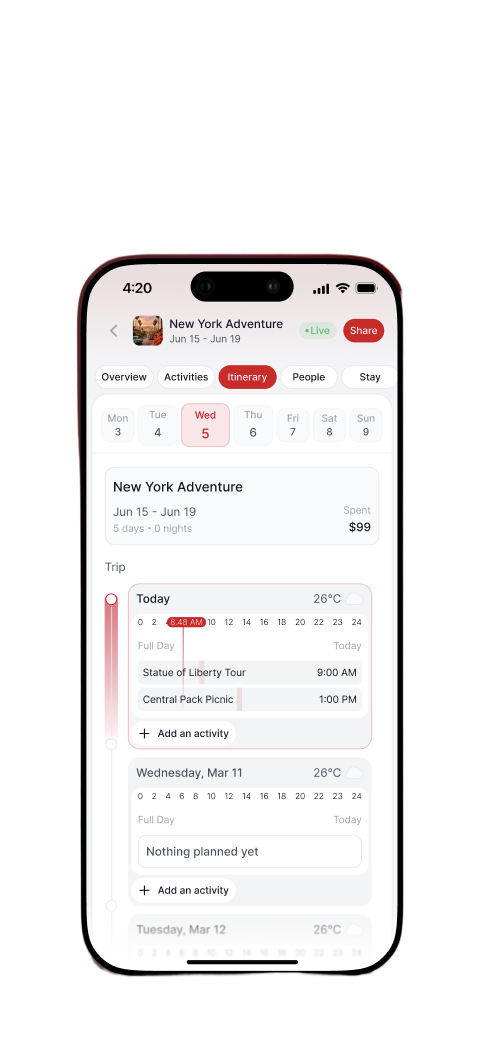
When an activity gets dragged to Confirmed, it automatically slots into the Itinerary tab. No copy-paste, no duplicate entry.
The itinerary shows a day selector across the top, a weather forecast for each day, and a 24-hour timeline underneath. Activities land in their approximate time slot. Tap any day to drag and reorder, add a new activity, or pull in a confirmed idea that hasn't been placed yet.
The weather is particularly useful for last-minute swaps — if it's going to rain Thursday, you can see that on Wednesday night and reshuffle the outdoor activities to Friday without any group chat drama.
What itinerary apps get wrong
Most itinerary builders require the organizer to do all the data entry while everyone else watches. In TRYPS, the itinerary is built by the voting process — the group decided what went in, so the itinerary already reflects what the group wants. The organizer's job is to sequence, not to sell.
Track expenses and settle up
As the trip happens, anyone in the group can add an expense. You enter what it was, who paid, and how to split it — evenly across everyone, or only across the people involved.
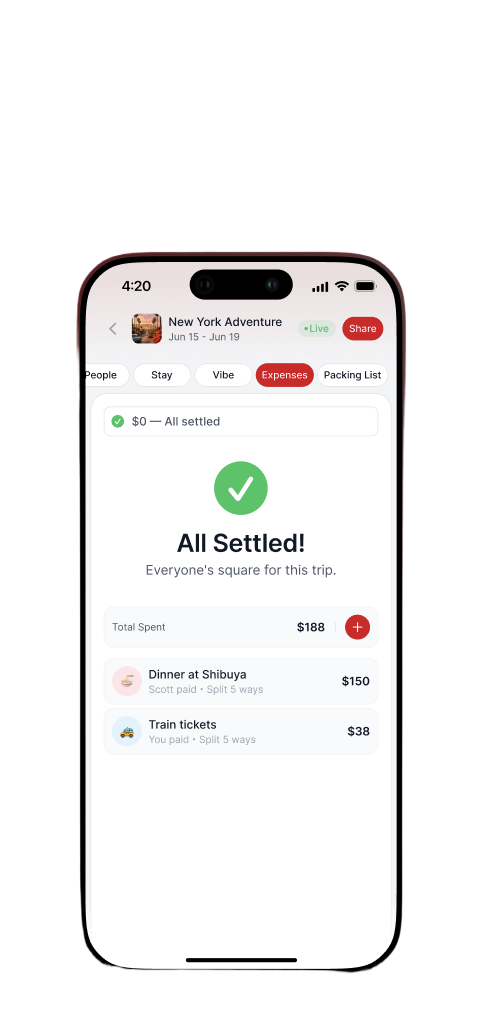
TRYPS keeps a running balance for each person and shows a single net number: who owes what, to whom. No per-expense tracking, no spreadsheet, no end-of-trip negotiation about who had the expensive cocktail.
When the trip ends and everyone settles up, TRYPS shows All Settled. One tap, clean slate.
Why not just use Splitwise?
You can — and a lot of groups do. But switching between apps to coordinate the trip and track costs adds friction every time something happens. Having expenses in the same app as the itinerary means the context is always there: you're looking at dinner at Shibuya in the itinerary and you can log the expense without leaving TRYPS.
The full picture
Five steps. One shared space. No friend needs to download anything before they can participate.
What TRYPS replaces: a group chat trying to do coordination, a separate date-poll link, a shared Google Sheet for the itinerary, and a Splitwise group for expenses. That's four separate tools that groups currently bounce between and still lose track of things.
What TRYPS requires from the host: about two minutes to set up the trip and send one iMessage. Everything else is collaborative.
Common questions
Do my friends need to download TRYPS to join my trip?+
No. When you tap Text Friends, TRYPS sends an iMessage with a join link. Friends tap the link and land directly inside the trip — they can vote on activities, see the itinerary, and add expenses without installing the app first.
Is TRYPS free to use?+
Yes. TRYPS is free for the host and every guest. There is no paywall on creating a trip, inviting friends, voting on activities, building an itinerary, or splitting expenses.
How does group voting on activities work in TRYPS?+
Anyone in the trip can add an activity to the Voting Block. Each member casts a thumbs-up or thumbs-down. Vote counts are visible to the whole group, so it's clear when something has consensus. Drag a popular activity to Confirmed and it slots into the day-by-day itinerary.
How does TRYPS split expenses between friends?+
When someone pays for something, they add the expense, choose who paid and how it splits — evenly across the group or only across the people involved. TRYPS keeps a running balance and shows All Settled when nobody owes anyone money.
Can I plan multiple trips at the same time?+
Yes. Each trip is a separate space with its own people, activities, itinerary, and expense ledger. Switch between them from the home screen without anything overlapping.
What kind of trips work best with TRYPS?+
Anything that involves more than two people making decisions together — weekend getaways, bachelor and bachelorette trips, ski trips, group beach vacations, multi-city adventures. The bigger the group, the more friction TRYPS removes.
What's the best app for planning a group trip with friends?+
TRYPS combines iMessage invites, group voting, a shared itinerary with weather and timing, and built-in expense splitting in one place. That's the difference: friend groups stop bouncing between WhatsApp, Google Sheets, and Splitwise and coordinate the whole trip from a single app.
Ready to plan your group trip?
Join the waitlist and be first to know when TRYPS launches on the App Store.
Join the waitlist →